Watch Ontario Road Rules in Motion: New Animations for the G1 Test
Four-way stops, roundabouts, left turns, school buses and more, as short narrated animations in the Ontario G1 Test app. Each one asks the question first, then shows the answer.
Some G1 questions are hard to picture from text alone. Who goes first when two cars stop at a four-way stop at the same time? Which lane do you use to turn left at a two-lane roundabout? Which lane do you end up in after a left turn onto a one-way road?
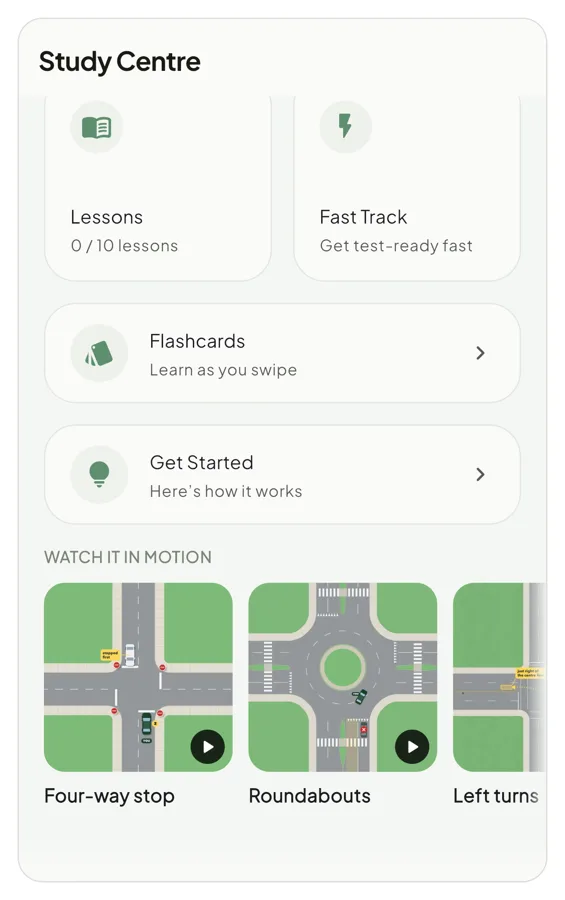
Version 1.2.7 of the Ontario G1 Test app adds Watch it in motion: short narrated animations that play these situations out on the road, step by step. Each one follows a section of the Official MTO Driver's Handbook and names that section in the app.
What the animations cover
There are seven, chosen because these topics come up again and again in G1 practice:
| Animation | MTO Driver's Handbook section |
|---|---|
| Four-way stop | Yielding the right-of-way |
| Roundabouts | Driving through roundabouts |
| Left turns | Left turns |
| School buses | Stopping for school buses |
| Emergency vehicles | Emergency vehicles |
| Entering a freeway | Entering a freeway |
| Hill parking | Parking on a hill |
Parallel parking and the three-point turn are road test skills, so they are not included yet.
Question first, then the answer
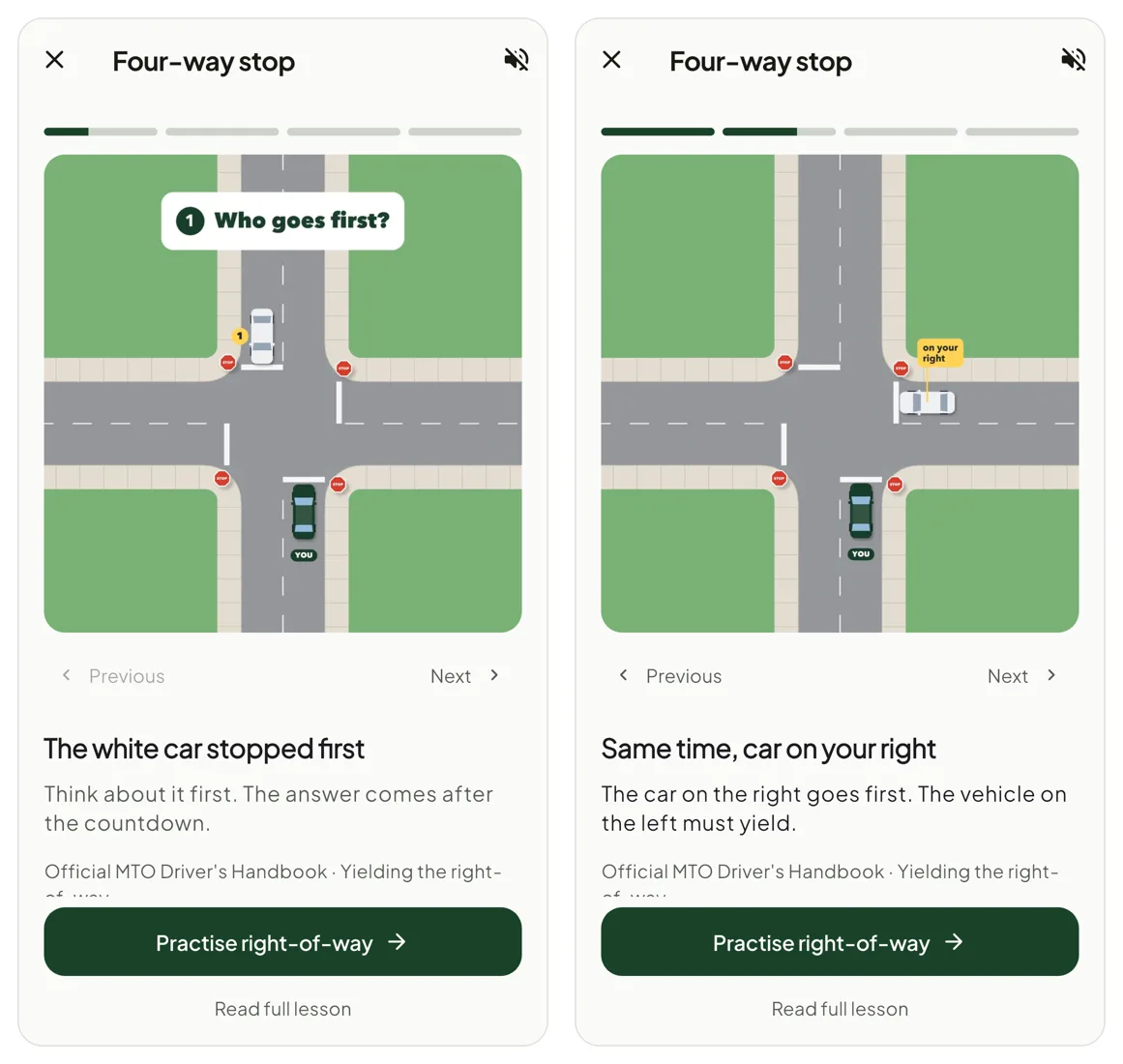
Most animations work like a short quiz. The roundabout one, for example, asks which lane to use three times: turning right, turning left and going straight.
- The question. The narrator sets the scene, and a card shows the question, like "Who goes first?"
- A short countdown. Time to decide before the answer comes.
- The answer. The cars move, the right lane or car is highlighted, and the narrator explains the rule.
The step text under the video waits too. During the question it says "Think about it first", and the answer only appears once the video gives it. That way you actually test yourself instead of reading the answer early.
Entering a freeway works a little differently. It is not a quiz but a step-by-step walkthrough of the merge, from checking your mirrors and blind spot on the ramp to turning off your signal once you are in the lane.
Move through it at your own pace
- Drag the step bar above the video to jump to any moment, or tap Previous and Next to go one step at a time.
- Tap the video to pause, and Replay at the end to watch it again.
- Narration is on by default. The mute button in the top corner is remembered for every animation, and on iPhone the sound follows your ring/silent switch.
Practise right after you watch
Under every animation there are two buttons:
- Practise, like "Practise roundabouts & turns", starts a 10-question quiz. It begins with questions on that exact topic, then adds related questions from the same lesson.
- Read full lesson opens the lesson section that covers the same rule, so you can read the details in the app's own words.
You will also find a Watch the animation card at the end of each matching lesson section, so you can go the other way round: read first, then watch.
Where to find it
Update the Ontario G1 Test app to version 1.2.7 or later. Watch it in motion is on the Home screen, below the study cards. Swipe the row sideways to see all seven.

Download the app
Ontario G1 Test
Study for the Ontario G1 driving knowledge test with quizzes, flashcards, and mock exams.
FAQ
Do the animations need an internet connection?
No. They are part of the app, so they play offline like the rest of your study material.
Are the animations based on the official handbook?
Yes. Every animation follows the Official MTO Driver's Handbook, and the player names the handbook section under each step so you can look it up.
Can I watch them without sound?
Yes. Tap the mute button in the top corner, or flip your iPhone to silent. The step text under the video says the same thing as the narration.
Is the app affiliated with the Ontario Ministry of Transportation?
No. The Ontario G1 Test app is an independent study tool. The G1 knowledge test itself is set by the Ontario Ministry of Transportation.
Sources
- Ontario Ministry of Transportation, Official MTO Driver's Handbook: Driving through intersections, Changing directions, Stopping, Dealing with particular situations, Freeway driving and Parking along roadways.
Read next
Temporary G1 Licence: How Long Is the Paper G1 Valid in Ontario?
A temporary G1 licence in Ontario is a paper licence valid for 90 days, and you can drive with it. When the card comes, what to carry, and what if it is late.
G1 Test Pass Mark in Ontario: 80%, Not Timed (2026 Guide)
You need a total score of at least 80% to pass the Ontario G1 test. It is multiple choice, not timed, on paper or computer, in 32 languages. Plus the $159.75 fee and the ID to bring.
Can You Renew a G1 in Ontario? What Happens When It Expires
No, you can't renew a G1 in Ontario. Once it expires you reapply as a new driver and pay the test fees again, unless you booked a road test before it expired.
How to Pass the G1 Test: 5-Step Study Plan (Ontario 2026)
Is the G1 test hard? Most people who fail never tested themselves first. A 5-step plan: study the MTO handbook in short sessions, drill road signs, memorize the numbers, and take free mock exams.
G1 Distracted Driving Penalty in Ontario: 30-Day Suspension
The G1 distracted driving penalty in Ontario is a 30-day suspension and a $615 fine for a first conviction, with no demerit points. See the full table.